
Own Your Day!
Own Your Day!
How to Create a Bank Account on Grey

Introduction
Grey, formerly known as Aboki Africa, is a financial technology company that helps you send and receive money across borders. It gives you access to foreign bank accounts so you can handle international payments with ease.
You can use Grey in many regions, including Africa, the United States, Europe, Latin America, and South East Asia.
In this guide, you will learn how to create a bank account on Grey in a simple and clear way.
Benefit of Creating a Bank Account on Grey
Some key benefits of creating a Grey bank account include:
- Foreign Currency Accounts: You will obtain a dedicated virtual accounts (USD, GBP, EUR) for receiving international payments directly from clients or platforms.
- Zero Hidden Fees: You will Enjoy low-cost, transparent, and often fee-free account maintenance.
- Fast Transfer: International transfers are typically completed within minutes, allowing quick access to funds.
- Better Exchange Rates: You can convert foreign currency to local currency (such as NGN) at better rates than traditional banks.
- Virtual Dollar Card: You have an access a virtual USD debit card for online shopping, subscriptions, and international payments.
- Easy and Secure Use: You experience 100% digital sign-up with no physical queues. 24-hour banking via mobile app, two-factor authentication, and robust security for your peace of mind.
- Naira Account Support: You can Easily link and transfer funds from your foreign currency accounts to a registered Nigerian Naira account.
- Perfect for Freelancers: Grey Bank account is Tailored for digital nomads and remote workers to manage international payments, invoices, and expenses in one place.
Read Also: How to Sign Up on grey.co
Supported Currencies
At the moment, Grey supports:
- Nigerian Naira (NGN)
- United States Dollar (USD)
- British Pound (GBP)
- Euro (EUR)
More currencies may be added in the future.
How to Create a Bank Account on Grey
You can create a bank account on Grey in two ways:
- Through the official website
- On the mobile app
Method 1: Create a Bank Account on Grey through the Website
Follow these steps:
Step 1: Login to your Account
Open your browser and Sign in to Login to your Gray account. But if you do not have one, learn how to sign up on Grey
Step 2: Select a Currency
On the navigation bar, Click on “Accounts”, and select the currency for which you want to create an account (USD, GBP, or EUR).
Note: Grey supports over 70 countries. Make sure your country is available.
Step 3: Get Bank Account
Click on “Get your (Currency) bank account”.
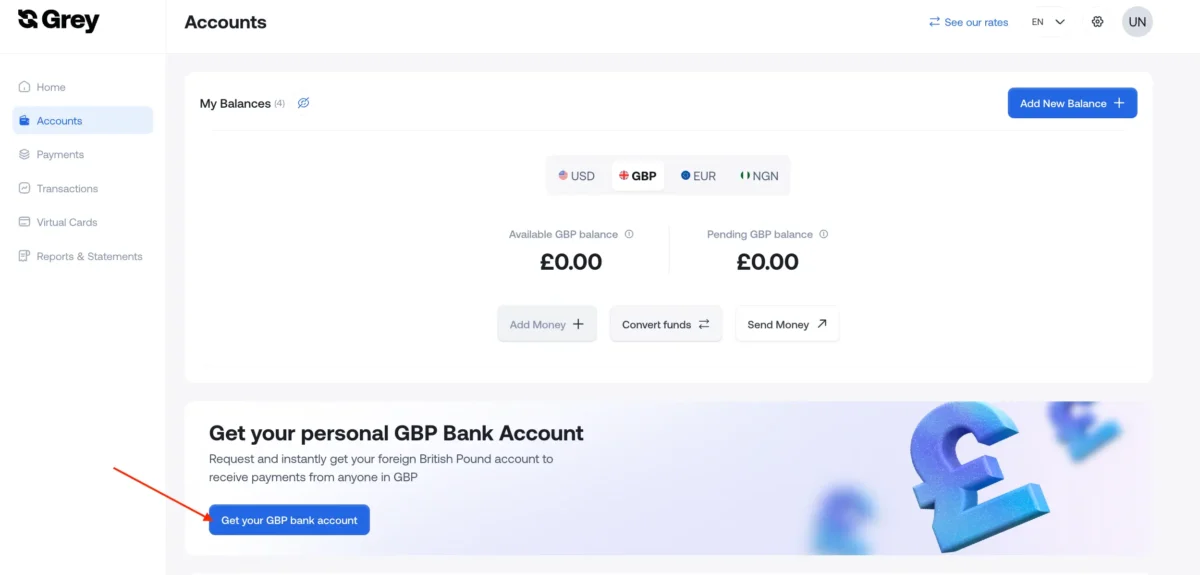
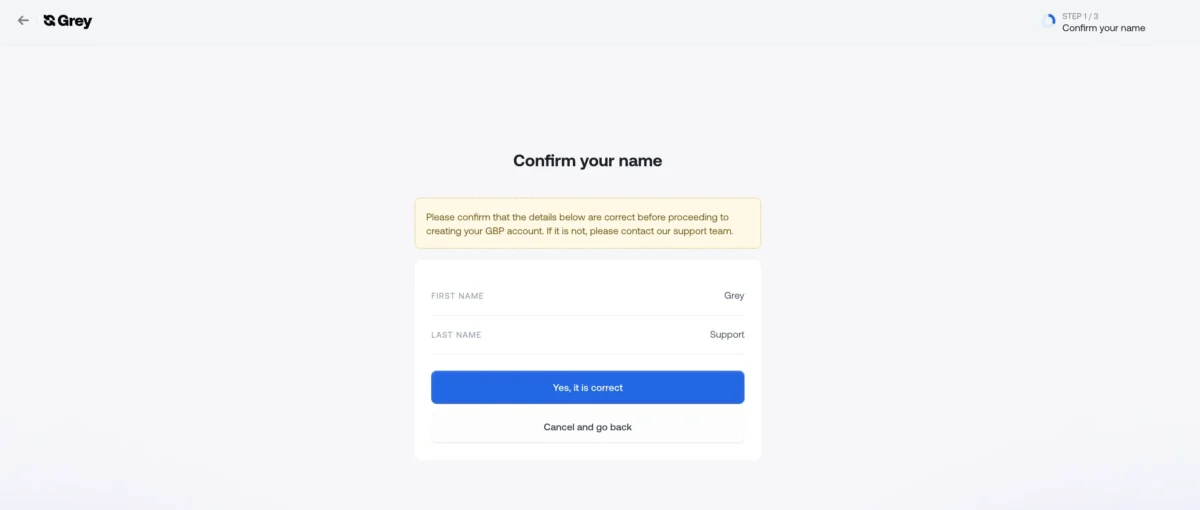
Step 4: Confirm your name
Check that your name is correct.
Important: You cannot change your name after the account is created.
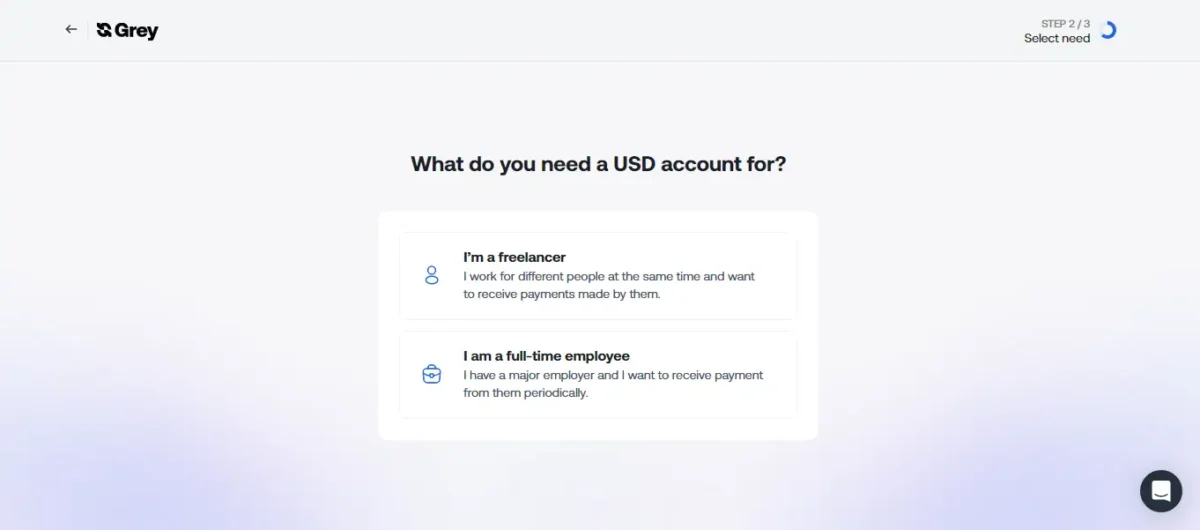
Step 5: Select a Reason
Choose why you want the account and follow the instructions.
Step 6: Complete the Process
Grey will create your account within a few minutes.
You will receive a confirmation notification.
Read Also: How to Use Google Wallet: Pay, Send & Receive Money
Method 2: Create a Bank Account on Grey through the Mobile App
To Create a Bank Account on Grey mobile app,
Step 1: Log in to Your Account
Open the Grey app and sign in.
Step 2: Choose a Currency
Select the currency for which you want to create an account from the drop-down
Step 3: Click “Get Bank Account”
Click on “Get your **Currency** bank account”.
Step 4: Confirm Your Name
Make sure your name is correct.
If you need to change it, contact Grey support.
Step 5: Select a Reason
Next up, select why you need the account and follow the prompts.
Step 6: Get Confirmation
Your account will be created within a few minutes, and you will be notified via email.
Frequently Asked Questions
Conclusion
Creating a bank account on Grey is quick and easy. You can do it through the website or mobile app in just a few minutes. And once your account is ready, you can receive international payments, hold foreign currencies, and manage your money without stress.
